Official Origami Tech Preset

Volume Futures Crypto Trading Bot

Automate small futures crypto trading cycles using current order book prices, a configurable spread limit and One Way position logic.

Difficulty: Beginner

Preset in Origami Tech: Futures | OneWay Mode | Volume Bot

Futures One Way DCA Bot preset in Origami Tech
Futures
Market
Volume
Strategy
One Way
Position Mode
25 sec
Cycle Delay
Crypto Trading Bot Preset

How the Futures | OneWay Mode | Volume Bot Works

A futures crypto trading strategy that uses current bid and ask prices, position data and a spread condition to manage repeated buy and sell cycles.

↗

Spread Check

The strategy calculates the current bid ask spread and compares it with the configured spread_limit before activating its buy logic.

Spread Limit

The visible spread_limit is 0.002. The buy condition uses this threshold together with the current position state.

Current Spread

spread_current is calculated dynamically from the current best ask and bid prices.

⇄

Order Book Pricing

The preset reads the best available futures order book prices. Buy orders use the current best ask, while sell orders use the current best bid.

$

Position Aware Execution

The preset reads the current One Way futures position and uses its available quantity to determine whether buy or sell logic can become active.

$

Small Buy Size

The visible buy volume formula uses 12 / execute_price, creating a small USD based order size that adjusts to the current futures price.

$

Position Exit

When the current position has a positive available quantity, the preset can place one sell order using the available position quantity.

✓

Execution Cycle

The strategy waits 25 seconds between execution cycles before evaluating its conditions again.

Market Context

When Traders May Use This Volume Strategy

This preset is designed around repeated futures crypto trading cycles, current order book prices and spread controlled execution.

✓

Strategy Context

  • Liquid futures markets with relatively narrow bid ask spreads
  • Strategies focused on repeated small crypto trading cycles
  • Traders who want execution to react directly to current order book prices
  • One Way futures accounts where one net position is managed at a time
!

Conditions to Watch

  • Wider spreads that increase the cost between entry and exit prices
  • Crypto trading fees accumulating across repeated executions
  • Fast price movement between the buy and sell stages
  • Reduced liquidity affecting fills at the best bid or ask
  • Open position exposure while the strategy waits for its next execution cycle
入门指南

Launch the Volume Futures Crypto Trading Bot

Import the official preset, review its order size, spread condition and One Way position settings, then enable it when the configuration matches your crypto trading approach.

01

Create or Open a Project

Use an existing Origami Tech project or create a workspace for the crypto trading bot.

02

Add an Exchange Account

Connect the exchange account that will be used for futures crypto trading through API credentials with the required trading permissions.

03

Create a Futures Crypto Trading Bot

Choose the connected account, futures pair, margin settings and leverage.

04

Import and Review the Preset

Select Futures | OneWay Mode | Volume Bot, review the spread limit, order sizing, position logic and execution timing, then save the bot and enable it when ready.

Actual Origami Tech Setup

Inside the Futures | OneWay Mode | Volume Bot

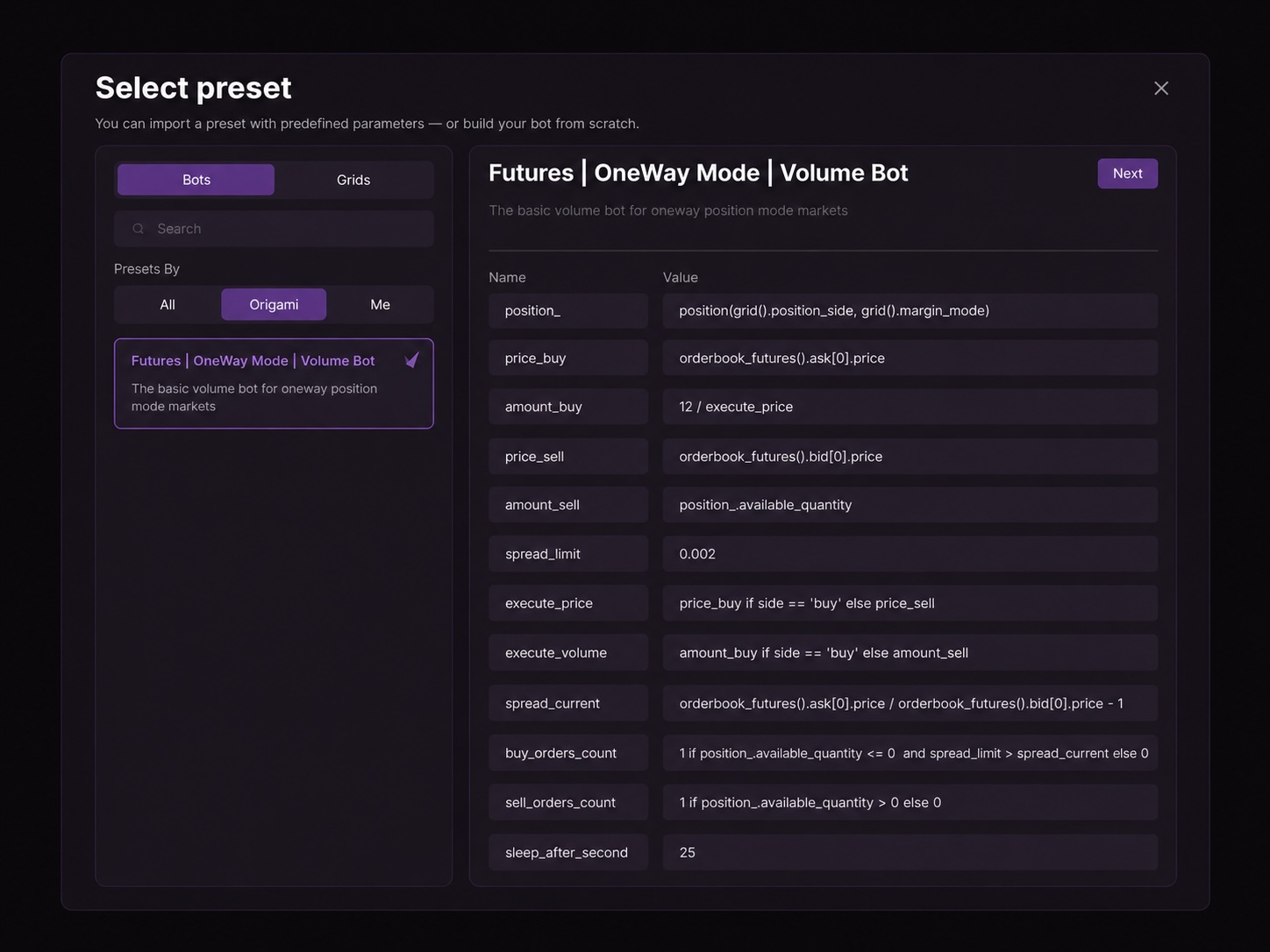
The preset uses current futures order book prices, a configurable spread limit and current position data to control its buy and sell execution cycle.

price_buy
Best futures ask price
price_sell
Best futures bid price
spread_limit
Visible default: 0.002
Cycle delay
sleep_after_second: 25

Additional visible variables include position_, amount_buy, amount_sell, execute_price, execute_volume, spread_current, buy_orders_count 以及 sell_orders_count.

Complete interface views of the Futures One Way DCA Bot preset
Preset Parameters

Key Preset Parameters

These variables define how the crypto trading bot reads the order book, evaluates spread, calculates order volume and responds to the current futures position.

position_

Reads the current futures position using the position side and margin mode configured for the bot.

price_buy

Uses the current best futures ask price as the buy price.

amount_buy

Uses the formula 12 / execute_price to calculate the buy quantity from a small USD based notional amount.

price_sell

Uses the current best futures bid price as the sell price.

amount_sell

Uses the available quantity of the current position as the sell volume.

spread_limit

Visible default: 0.002. Defines the spread threshold used by the buy activation logic.

spread_current

Calculates the current difference between the best ask and best bid in the futures order book.

execute_price

Selects price_buy for buy execution and price_sell for sell execution.

execute_volume

Selects the calculated buy or sell volume according to the current execution direction.

buy_orders_count

Allows one buy order when the position condition and spread condition defined by the preset are satisfied.

sell_orders_count

Allows one sell order when the current position has positive available quantity.

sleep_after_second

Visible default: 25. Defines the delay before the strategy evaluates its execution cycle again.

Supported Exchanges

Use the Preset on Supported Futures Integrations

Origami Tech connects to multiple centralized and decentralized exchanges. Preset availability depends on the futures functionality and account configuration supported by each integration. Check current compatibility inside Origami Tech before launch.

Monitoring

What Happens After Launch

The active crypto trading bot receives futures market data, recalculates its formulas and sends permitted orders through the connected exchange API when strategy conditions are met.

Position

Follow current futures exposure and position direction.

Orders

Review the orders created by the preset.

Realized PnL

Track completed crypto trading activity.

Unrealized PnL

Monitor the current result of open positions.

Explore More Strategies

Related Origami Tech Crypto Trading Bot Presets

Use the preset library to compare different automation approaches and strategy logic.

DCA Futures Crypto Trading Bot

Automates gradual futures position scaling with dynamic pricing, position aware sizing and predefined exit logic.

Explore Preset

Grid + RSI Futures Crypto Trading Bot

Uses two 50 level grids, RSI conditions and separate long and short position management in Hedge Mode.

Explore Preset

Pair Trading Futures Crypto Trading Bot

Compares relative ROI across two futures markets and uses portfolio aware averaging, position sizing and exit logic.

Explore Preset

Hyperliquid RSI Price Spikes Crypto Trading Bot

Uses 1 minute RSI signals and dynamic RSI based price calculations to react to short term price extremes on Hyperliquid.

Explore Preset
FAQ

还有问题吗?

What is the Futures | OneWay Mode | Volume Bot?⌄
The Futures | OneWay Mode | Volume Bot is an Origami Tech preset designed for repeated futures crypto trading cycles using current order book prices, spread conditions and One Way position management.
How does the bot choose its buy price?⌄
The preset uses the current best ask price from the futures order book as its buy price.
How does the bot choose its sell price?⌄
The preset uses the current best bid price from the futures order book as its sell price.
How does the bot use spread?⌄
The preset calculates the current bid ask spread and compares it with spread_limit, which has a visible value of 0.002. This condition is included in the buy activation logic.
How large is the buy order?⌄
The visible formula uses 12 / execute_price, so the buy quantity is calculated from an approximately $12 notional value and the current execution price.
Which exchanges can I use?⌄
Use the preset where the required Origami Tech futures integration and account configuration are supported. Check current compatibility inside Origami Tech before launch.
How is the sell volume calculated?⌄
The sell volume uses the available quantity of the current position.
What does One Way mode mean?⌄
One Way mode manages one net futures position for the selected market. Buy and sell activity changes the size and direction of that single position.
How often does the strategy evaluate its cycle?⌄
The visible sleep_after_second parameter is set to 25, so the strategy waits 25 seconds between execution cycles.
Does the bot keep running when my computer is offline?⌄
Yes. Active Origami Tech crypto trading bots run through cloud infrastructure, so your browser does not need to remain open.
FUTURES | ONEWAY MODE | VOLUME BOT

Start With the Official Volume Futures Preset

Import the Futures | OneWay Mode | Volume Bot in Origami Tech, review its spread condition, order sizing and position logic, and configure the strategy according to your own futures crypto trading approach.

General disclaimer: Crypto trading involves substantial risk and can result in partial or complete loss of capital. Futures crypto trading involves additional risks associated with leverage, margin, liquidation, fees and execution.Origami Tech provides software for creating, configuring and executing automated crypto trading strategies. Presets provide predefined strategy logic and do not guarantee profitability or future performance.Users remain responsible for reviewing strategy parameters, exchange settings, leverage, position sizing, crypto trading fees and overall risk before enabling a crypto trading bot.