Official Origami Tech Preset

DCA Futures Crypto Trading Bot

Automate gradual futures position management with the official Futures | One Way | DCA Bot preset in Origami Tech.

Preset in Origami Tech: Futures | One Way | DCA Bot

Futures One Way DCA Bot preset in Origami Tech
Futures
Market
DCA
Strategy
One Way
Position Mode
24/7
Cloud Execution
Crypto Trading Bot Preset

How the Futures | One Way | DCA Bot Works

A ready made futures crypto trading strategy that uses dynamic formulas for order prices, position size, balance checks and exit conditions.

↗

Dynamic Order Pricing

Buy and sell prices are calculated from futures market data, spread and position related variables. The crypto trading bot recalculates its next action as conditions change.

Position Scaling

The strategy can add exposure when its predefined position and price conditions are met.

Take Profit Logic

The preset includes exit logic based on the current position and the configured take profit parameter.

⇄

One Way Position Logic

The preset manages one net futures position for the selected market. Buy and sell activity changes the overall position.

$

Dynamic Order Size

Order volume is calculated through preset formulas according to the current position and execution direction.

✓

Balance Checks

Available counter asset balance is included in the execution logic before new orders are placed.

⟳

Continuous Monitoring

After a fill or exit, the bot continues evaluating futures market data according to the preset logic.

Market Context

When Traders May Use This DCA Strategy

This preset is designed for traders who use gradual position scaling and want to automate repeated calculations and order execution.

✓

Strategy Context

  • Liquid futures markets with repeated entry and exit opportunities
  • Strategies that use gradual position scaling
  • Systematic order execution based on predefined rules
  • Traders who already understand futures crypto trading
!

Conditions to Watch

  • Prolonged directional moves against the position
  • Rapid volatility expansion
  • Reduced liquidity and wider spreads
  • Elevated perpetual futures funding
  • Position exposure growing beyond the intended level
DEX & CEX
DEX & CEX
DEX & CEX
DEX & CEX
Use the preset where the required Origami Tech futures integration and account configuration are supported.
はじめに

Launch the DCA Futures Crypto Trading Bot

Import the official preset, review the strategy and enable it after checking your own futures settings and risk limits.

01

Create or Open a Project

Use an existing Origami Tech project or create a workspace for the crypto trading bot.

Project
02

Add an Exchange Account

Connect the exchange account that will be used for futures crypto trading through API credentials with the required trading permissions.

API Account
03

Create a Futures Crypto Trading Bot

Choose the connected account, futures pair, margin settings and leverage.

Futures
04

Import and Review the Preset

Select Futures | One Way | DCA Bot, inspect the parameters, adjust the setup if required, save the bot and enable it when ready.

Use Preset
Actual Origami Tech Setup

Inside the Futures | One Way | DCA Bot

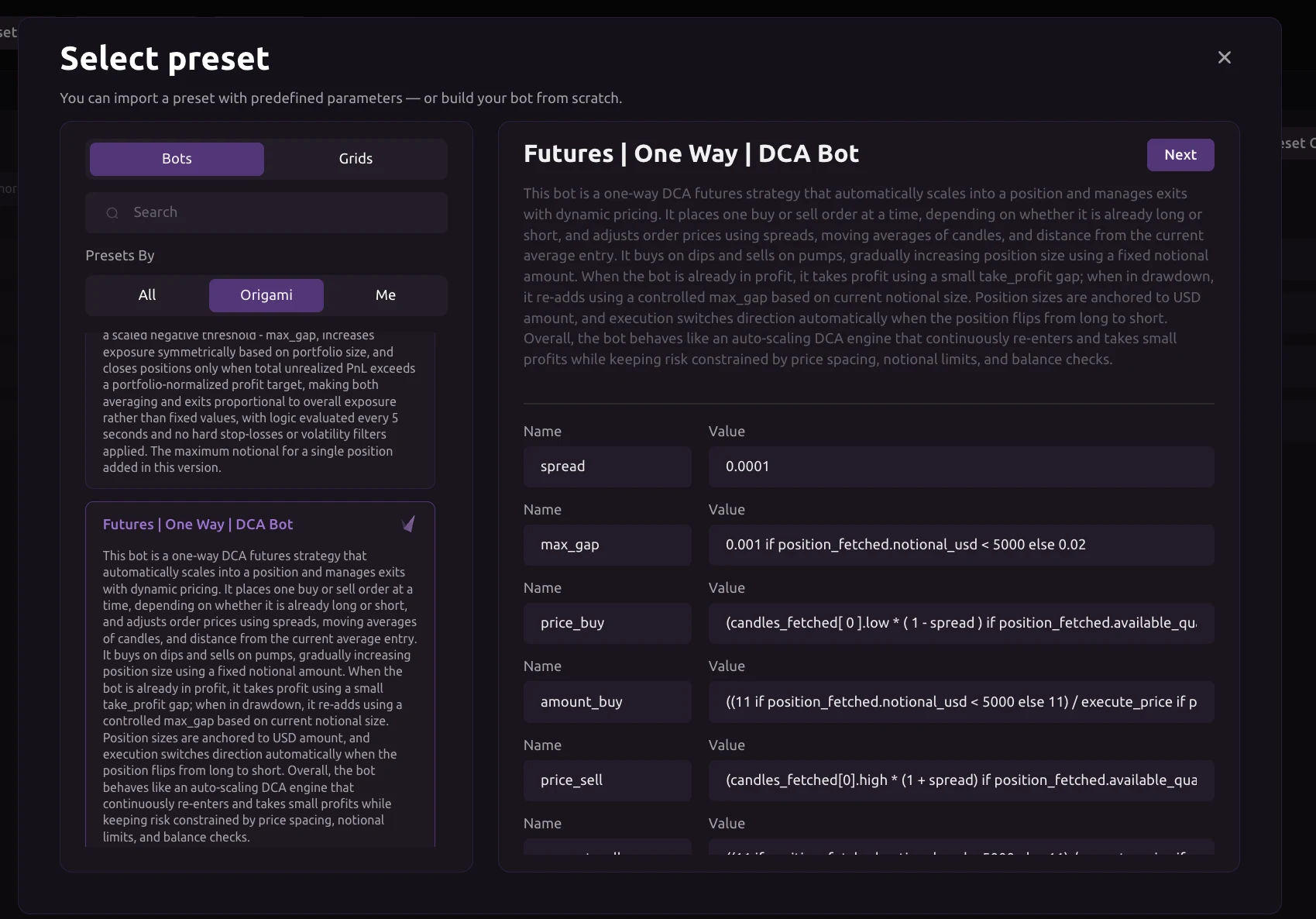
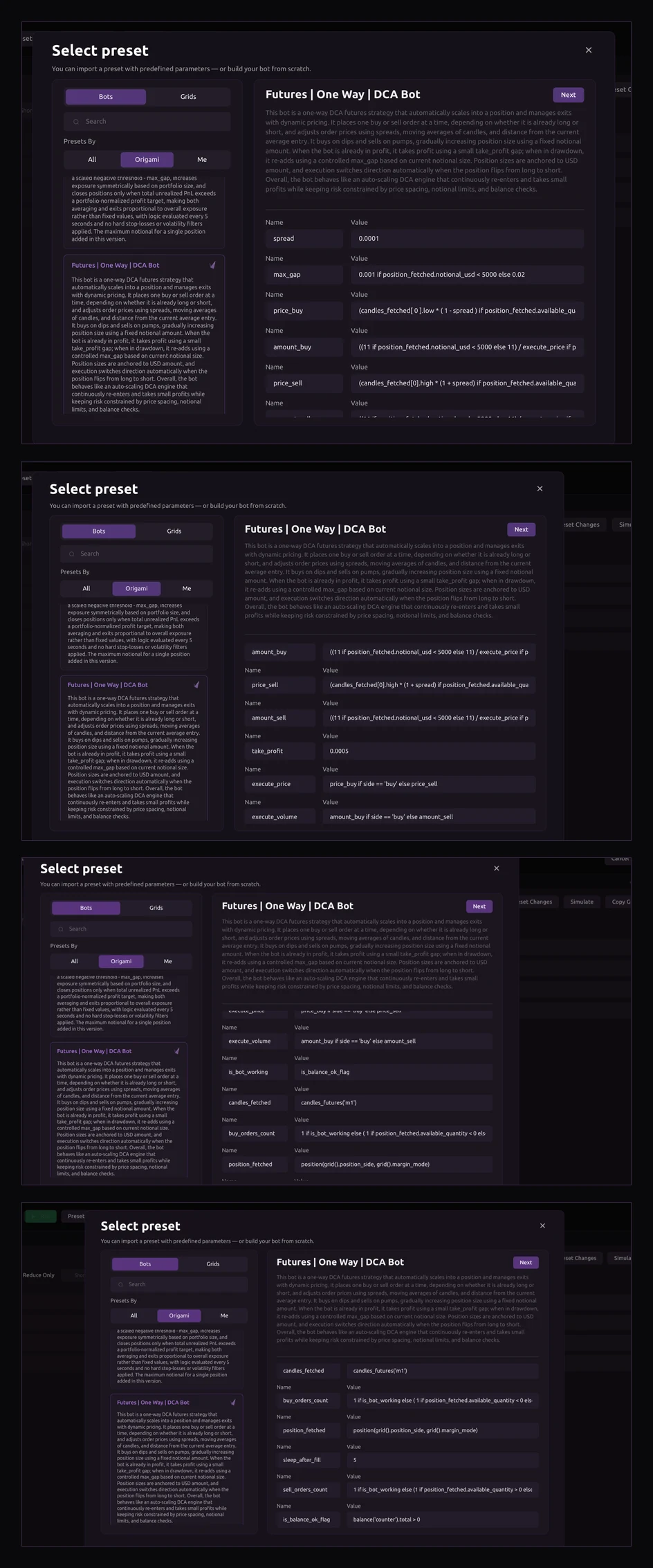
The interface screenshots show the real preset configuration across its scroll positions. The strategy includes formulas and variables for pricing, volume, take profit, market data, balance checks and execution timing.

spread
Visible default: 0.0001
take_profit
Visible default: 0.0005
candles_fetched
candles_futures('m1')
sleep_after_fill
Visible default: 5

Additional visible variables include max_gap, price_buy, amount_buy, price_sell, amount_sell, execute_price, execute_volume, position_fetched, buy_orders_count, sell_orders_count and is_balance_ok_flag.

Complete interface views of the Futures One Way DCA Bot preset
Preset Parameters

Key Preset Parameters

These visible variables define how the crypto trading bot calculates orders, reads the current position and controls execution.

spread

Visible default: 0.0001. Used as part of the dynamic order price calculation.

max_gap

Dynamic parameter that controls a maximum price distance used by the position scaling logic.

price_buy

Dynamic formula that calculates the next buy price from market and position variables.

price_sell

Dynamic formula that calculates the next sell price from market and position variables.

amount_buy

Dynamic formula that calculates the volume of a potential buy order.

amount_sell

Dynamic formula that calculates the volume of a potential sell order.

take_profit

Visible default: 0.0005. Used by the preset when calculating its exit price.

execute_price

Chooses the relevant calculated order price according to the current execution direction.

execute_volume

Chooses the calculated order volume used for execution.

candles_fetched

candles_futures('m1'). Fetches one minute futures candle data used by the strategy.

position_fetched

Reads the current futures position and makes its data available to the preset formulas.

sleep_after_fill

Visible default: 5. Adds a short delay after an order has been filled.

is_balance_ok_flag

Checks available counter asset balance as part of the execution logic.

Customization

What You Can Customize

The official preset can be used as a starting point and adjusted to fit a trader's own crypto trading strategy and risk limits.

Entry Logic
Adjust variables involved in calculating new entries.
Position Size
Modify formulas used for buy and sell order volume.
Position Scaling
Change parameters that influence additional exposure.
Exit Logic
Adjust take profit and other exit conditions.
Position Mode

What Does One Way Mode Mean?

One Way mode uses one net position for a selected futures market. Buy orders can increase long exposure or reduce an existing short position. Sell orders can increase short exposure or reduce an existing long position. The DCA preset reads the current position and uses this information when calculating subsequent actions.

Long   ←   Flat   →   Short
Who It Is For

Who May Find This Preset Useful?

Basic knowledge of perpetual futures, leverage, margin and liquidation is recommended before using this preset.

Futures Traders

For users who already understand perpetual futures and want repeatable execution rules.

DCA Strategy Users

For traders who already use gradual position scaling and want to automate calculations and order placement.

Automation Users

For users who want a ready made crypto trading bot strategy that can be reviewed and customized before launch.

One Way Mode Users

For strategies that manage one net futures position for the selected market.

Before You Start

What You Need Before Launch

Prepare the account and futures settings before importing the preset.

Origami Tech Account

Create an account and open the project where the crypto trading bot will run.

Exchange API Account

Connect a supported exchange account with the permissions required for crypto trading execution.

Funded Futures Account

Use a supported futures pair and make sure sufficient balance is available for the intended position size.

Futures Settings

Review One Way mode, margin mode and leverage before enabling the strategy.

Risk Considerations

Understand the Main Risks

Futures crypto trading can create significant losses, especially when leverage and position scaling are involved.

×

Leverage Risk

Leverage increases the effect of market movements on both gains and losses.

!

Liquidation Risk

A sufficiently adverse move can cause the exchange to liquidate a futures position.

+

Position Scaling Risk

Additional entries increase total exposure during an adverse price move.

%

Fees and Funding

Repeated entries create exchange fees and open perpetual futures positions can incur funding.

≈

Market Regime Risk

Strategy behavior can change during strong trends, volatility spikes or shifts in liquidity.

↯

Execution Risk

Liquidity, spread and volatility can cause actual fills to differ from calculated prices.

Risk disclaimer: Crypto trading involves risk of financial loss. Review the preset logic, leverage, margin settings, position size, exchange fees, funding and your own risk limits before enabling live execution.
Supported Exchanges

Use the Preset on Supported Futures Integrations

Origami Tech connects to multiple centralized and decentralized exchanges. Preset availability depends on the futures functionality and account configuration supported by each integration. Check current compatibility inside Origami Tech before launch.

Binance
Origami Tech integration
Bybit
Origami Tech integration
OKX
Origami Tech integration
Gate
Origami Tech integration
MEXC
Origami Tech integration
KuCoin
Origami Tech integration
ハイパーリキッド
Origami Tech integration
Bitget
Origami Tech integration
BingX
Origami Tech integration
Aster
Origami Tech integration
Lighter
Origami Tech integration
More
Check the current list in Origami Tech
Non Custodial Execution

Your Funds Stay on Your Exchange

Origami Tech connects to exchange accounts through API keys. Crypto trading and balance permissions are used for bot execution, while withdrawal permissions are not required. Users can revoke or rotate exchange credentials when needed.

Security Check Before Launch

Use an exchange subaccount where appropriate, keep withdrawal permissions disabled and review API access before enabling a live crypto trading bot.

Video Guide

Set Up the Futures | One Way | DCA Bot

Use a short setup video here to show preset import, key parameters, futures settings, activation and monitoring inside the Origami Tech crypto trading bot platform.

▶

DCA Futures Crypto Trading Bot Setup

Replace this card with the final YouTube or product walkthrough video.

Monitoring

What Happens After Launch

The active crypto trading bot receives futures market data, recalculates its formulas and sends permitted orders through the connected exchange API when strategy conditions are met.

Position

Follow current futures exposure and position direction.

Orders

Review the orders created by the preset.

Realized PnL

Track completed crypto trading activity.

Unrealized PnL

Monitor the current result of open positions.

Strategy Review

When to Review Your Setup

Review the preset when volatility changes significantly, position exposure becomes larger than intended, futures funding becomes material, liquidity conditions change, available balance changes or the original market assumptions are no longer relevant.

詳細はこちら

Content Around This Crypto Trading Bot Preset

Use these existing content blocks to connect the preset page with education, documentation, video and workshops.

How DCA Crypto Trading Bots Work

Explain gradual position scaling and the mechanics behind automated DCA strategies.

Read Guide

Preset Documentation

Document variables, formulas, supported futures settings and technical behavior.

View Documentation

Setup Video

Show how to import, review and launch the preset inside Origami Tech.

Watch Video

Online Workshop

Walk through DCA logic, configuration, risk considerations and live product setup.

Watch Workshop
Explore More Strategies

Related Origami Tech Crypto Trading Bot Presets

Use the preset library to compare different automation approaches and strategy logic.

RSI Futures Crypto Trading Bot

Futures strategy logic based on RSI conditions.

Explore Preset

Grid Futures Crypto Trading Bot

Automated futures orders based on grid logic.

Explore Preset

Pair Crypto Trading Bot

Strategy logic across two related futures markets.

Explore Preset

Hyperliquid RSI Crypto Trading Bot

RSI based price calculations for a Hyperliquid futures setup.

Explore Preset
FAQ

ご質問はありますか?

What is the Futures | One Way | DCA Bot?⌄
It is an official Origami Tech preset for automating a DCA based strategy in perpetual futures markets. The preset contains predefined formulas for order prices, position sizing, position checks, balance conditions and exits.
What does DCA mean in this preset?⌄
The preset can gradually change position exposure according to predefined conditions. Additional orders are calculated dynamically from market and position data.
Does the bot buy at fixed time intervals?⌄
The strategy uses dynamic conditions and formulas. Its order logic depends on current market data and the state of the futures position.
What does One Way mode mean?⌄
One Way mode keeps one net position for the selected futures market. Buy and sell activity changes that overall position rather than maintaining separate long and short positions at the same time.
Can I change the preset parameters?⌄
Yes. Preset values and strategy logic can be reviewed and customized before the bot is saved and launched.
Which exchanges can I use?⌄
Use the preset where the required Origami Tech futures integration and account configuration are supported. Check current compatibility inside Origami Tech before launch.
Can this crypto trading bot lose money?⌄
Yes. Futures crypto trading involves market, leverage, liquidation, execution, fee and funding risks. Position scaling can also increase exposure during an adverse price move.
Does Origami Tech hold my funds?⌄
Funds remain on the connected exchange account. Origami Tech uses API connectivity to execute permitted crypto trading actions.
Can Origami Tech withdraw funds from my exchange account?⌄
Withdrawal permissions are not required. The recommended API configuration uses read and crypto trading permissions.
Does the bot keep running when my computer is offline?⌄
Yes. Active Origami Tech crypto trading bots run through cloud infrastructure, so your browser does not need to remain open.
Futures | One Way | DCA Bot

Start With the Official DCA Futures Preset

Import the preset in Origami Tech, review its parameters and configure the strategy according to your own futures crypto trading approach.

General disclaimer: Crypto trading involves substantial risk and can result in partial or complete loss of capital. Futures crypto trading involves additional risks associated with leverage, margin, liquidation and funding. Origami Tech provides software for creating, configuring and executing automated crypto trading strategies. Presets provide predefined strategy logic and do not guarantee profitability or future performance. Users remain responsible for reviewing strategy parameters, exchange settings, leverage, position sizing and overall risk before enabling a crypto trading bot.